DevOps Automation: How to Build Faster, Safer, and More Reliable Software
Introduction
Modern software teams must deliver updates quickly and keep their systems stable. Manual work can make this goal harder to reach. Developers may spend hours running tests, fixing setup issues, and preparing releases. These repeated tasks can slow down projects and lead to mistakes. DevOps automation helps teams handle routine work through scripts and tools. It connects coding, testing, deployment, and monitoring in one clear process. Teams can check code changes, prepare environments, and release updates with less manual effort. They can also find problems sooner and respond faster. However, good automation needs careful planning. Teams must choose useful tools, protect sensitive data, and test every important step. They should begin with simple tasks and improve their process over time. This guide explains the main ideas, tools, benefits, and steps for building a practical DevOps automation process.
What Is DevOps Automation?
DevOps automation means using tools, scripts, and workflows to complete repeated software tasks. It helps development and operations teams follow the same steps each time.
For example, a developer changes an application's code and submits it to a shared repository. An automated workflow can build the application, run tests, and check code quality. If the checks pass, the workflow can prepare the application for release.
Teams can automate many tasks, such as:
Building and packaging software.
Running tests after code changes.
Checking code quality and known security risks.
Creating cloud resources and servers.
Applying system settings.
Deploying approved software updates.
Collecting system data and sending alerts.
Automation does not replace human judgment. Teams still need people to review changes, manage risks, and solve complex problems. Automation simply makes routine work more consistent and easier to repeat.
Why Is DevOps Automation Important?
Manual processes often depend on individual habits. Different team members may follow different steps. This can create inconsistent results and make problems harder to find.
Automation gives teams a repeatable process. It can run the same checks for every code change and record the results. This helps teams find issues before they reach users.
The main reasons teams adopt DevOps automation include:
Faster workflows: Tools can complete routine tasks without constant manual action.
Fewer human errors: Scripts follow defined steps instead of relying on memory.
Better software quality: Automated tests check code changes more often.
Consistent environments: Teams can reuse approved settings across systems.
Clearer teamwork: Shared workflows help developers and operations staff work together.
Improved recovery: Monitoring and deployment tools can help teams detect and manage failures.
The goal is not to automate every task. Teams should focus on work that saves time, reduces risk, or improves software quality.
How Does DevOps Automation Work?
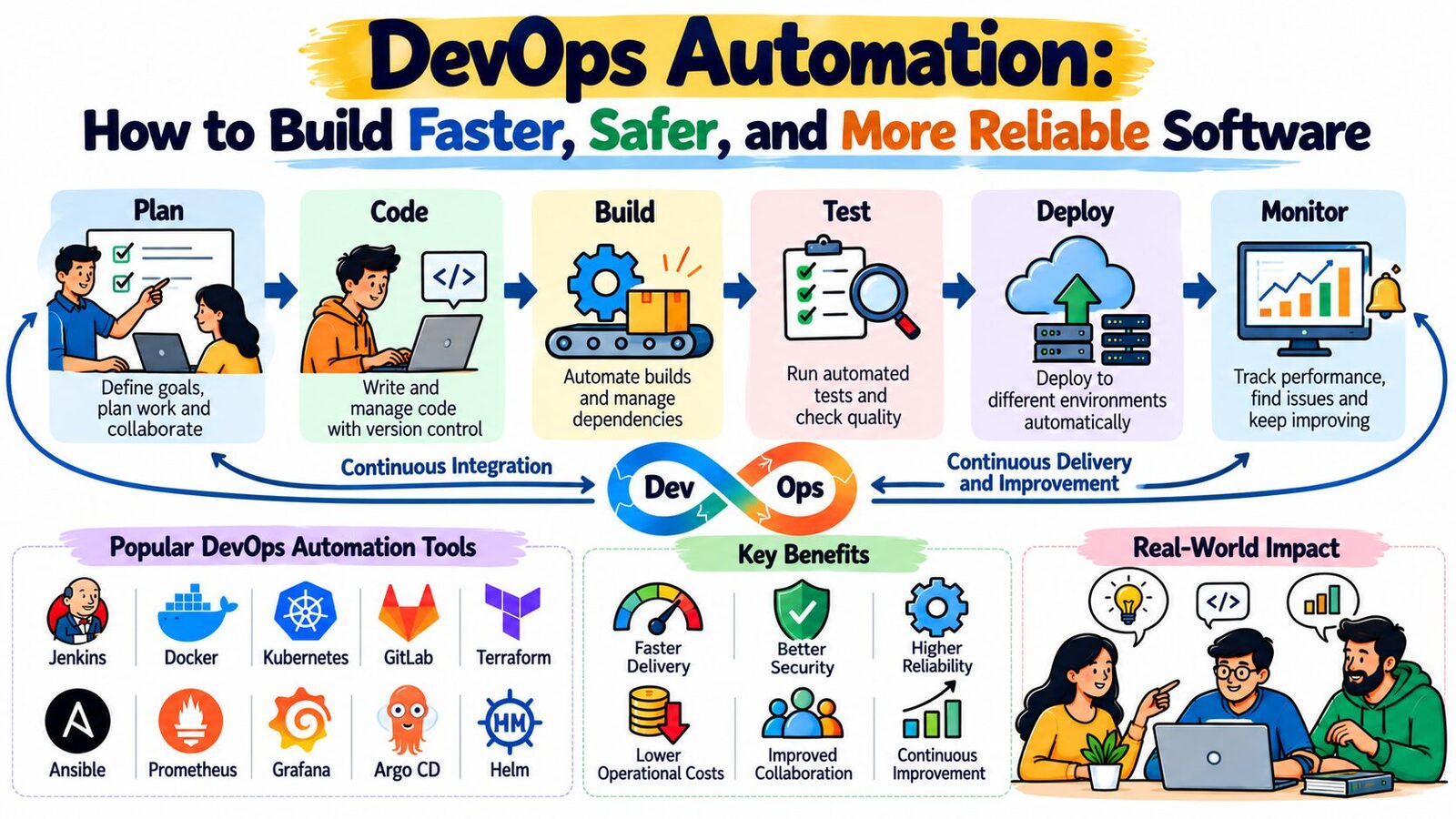
A DevOps automation process usually follows a series of connected stages. Each stage checks the work before passing it to the next one.
Code Management
Developers store source code in a version control system such as Git. The system tracks changes and supports code reviews. This gives the team a clear record of its work.
Automated Builds
A build tool turns source code into an application package. The workflow can start a new build whenever someone submits a change. Build failures help developers find problems early.
Automated Testing
The pipeline runs tests to check whether the application works as expected. These tests may cover individual functions, connected services, and full user journeys. The workflow can stop when important tests fail.
Security and Quality Checks
Tools can scan code and dependencies for known risks. They can also check code quality and flag common issues. Teams should define clear rules for handling serious findings.
Deployment
After the required checks pass, the workflow can deploy the application to a test environment. Some teams use manual approval before production releases. Others allow automatic deployment after all required checks pass.
Monitoring and Improvement
Monitoring tools track application health and system performance. Alerts help teams investigate unusual behavior. Teams can use these findings to improve their code and delivery process.
Key Types of DevOps Automation
Different types of automation solve different problems. A strong workflow connects them where needed.
Continuous Integration
Continuous integration, also called CI, brings code changes together and checks them often. The system builds the application and runs tests. This approach helps developers catch errors before they spread.
Continuous Delivery
Continuous delivery keeps software ready for release. Automated checks prepare each change, while a team member may approve the final deployment.
Continuous Deployment
Continuous deployment releases changes automatically after they pass the required checks. Teams need reliable tests, monitoring, and recovery plans before using this approach.
Infrastructure as Code
Infrastructure as Code, or IaC, lets teams define infrastructure through code files. These files can describe servers, networks, and cloud resources. Teams can review, reuse, and track changes to their infrastructure.
Configuration Management
Configuration management applies planned settings to servers and systems. It can install packages, update files, and manage services. This helps teams keep systems aligned.
Test Automation
Test automation runs planned checks without requiring someone to perform every step manually. It can test application features, APIs, and system behavior. Teams should still use manual testing for areas that need human judgment.
Monitoring Automation
Monitoring automation collects system data and checks it against defined limits. It can send alerts when errors rise or performance drops. Teams can use these alerts to respond before small issues grow.
Popular Tools Used in DevOps Automation
Each tool serves a different purpose. Teams should choose tools based on their current systems, technical skills, and delivery goals.
| Tool | Main role | Typical use |
|---|---|---|
| Jenkins | CI/CD automation | Building and deploying applications |
| GitHub Actions | Workflow automation | Running tests and tasks from a repository |
| GitLab CI/CD | Software delivery | Managing automated builds and releases |
| Ansible | Configuration management | Applying settings to servers |
| Terraform | Infrastructure as Code | Creating and updating infrastructure |
| Docker | Containerization | Packaging applications and dependencies |
| Kubernetes | Container management | Running and managing container-based applications |
| Prometheus | Metrics collection | Tracking system and application metrics |
| Grafana | Monitoring dashboards | Viewing performance data |
| SonarQube | Code quality analysis | Finding code issues and quality risks |
Do not choose a tool just because it is popular. First, define the task you want to improve. Then compare the tool's features, costs, security options, and fit with your existing systems.
Steps to Build a DevOps Automation Workflow
A clear plan helps teams avoid unnecessary work. Follow these steps to create a practical workflow.
Identify the Main Problem
Start by reviewing your current delivery process. Find tasks that take too long or often cause errors. Examples include manual testing, repeated server setup, and slow releases.
Set a Measurable Goal
Choose one result you want to improve. You might want to shorten build times, reduce failed deployments, or cut repeated manual work. Record your current results before making changes.
Select a Suitable Tool
Choose a tool that solves your main problem. Check whether it works with your code platform and infrastructure. Keep the first setup simple.
Automate Basic Checks
Create a pipeline that builds the application and runs important tests. Make sure the team can understand the results. Fix unstable tests before adding more steps.
Add Deployment Automation
Once the build and tests work well, automate deployment to a test environment. Check the release carefully before expanding the process to production.
Protect Secrets and Access
Store passwords, tokens, and keys in an approved secret manager. Limit workflow permissions to the tasks they need. Review access when team members or systems change.
Add Monitoring and Recovery
Track system health after deployment. Set alerts for important failures and performance issues. Prepare a rollback or recovery plan for releases that cause problems.
Review and Improve
Check pipeline results regularly. Ask the team which steps still cause delays. Remove unused tasks and update scripts as your systems change.
Benefits of DevOps Automation
DevOps automation can improve software delivery when teams apply it with care.
Faster software releases: Automated builds, tests, and deployments reduce repeated manual steps. Teams can spend more time improving their products.
More consistent results: A shared workflow follows the same rules for each release. This reduces differences caused by individual working habits.
Earlier error detection: Automated checks can catch problems soon after code changes. Developers can then fix issues while the changes remain fresh.
Better use of staff time: Teams spend less time on routine work. They can focus on design, problem-solving, and customer needs.
Easier infrastructure management: Infrastructure code helps teams repeat approved setups. It also makes changes easier to review and track.
Clearer feedback: Pipeline logs and monitoring data show where failures occur. Teams can use this information to improve their process.
Stronger security controls: Teams can add security scans and access rules to delivery workflows. They must still review findings and maintain secure settings.
These benefits depend on the quality of the workflow. Poor tests, unsafe scripts, and weak access controls can create new risks.
Common DevOps Automation Challenges
Automation can fail when teams rush into implementation. Watch for these common challenges.
Automating unclear processes: Define and improve the process before writing scripts.
Adding too many tools: Choose a small set that meets real needs.
Using weak tests: Check whether tests cover important features and risks.
Ignoring failed jobs: Find the cause instead of repeatedly restarting workflows.
Exposing sensitive data: Keep secrets out of source code and public logs.
Skipping recovery planning: Prepare a safe way to restore service after a failed release.
Neglecting documentation: Explain how workflows work and how to fix common failures.
Forgetting maintenance: Review scripts, dependencies, and tool settings regularly.
Teams should treat automation as an ongoing process. They need to review results and update workflows when requirements change.
Important Considerations Before Automating
Before expanding automation, consider the following areas.
Security and permissions: Give each workflow only the access it needs. Protect credentials and review who can approve or deploy changes.
Testing quality: Automated tests should cover the most important features. Keep tests reliable so they provide useful feedback.
Rollback and recovery: Plan how to restore a working version if a release fails. Test recovery steps before relying on them.
Tool compatibility: Make sure your tools work with your code, hosting platform, and infrastructure. Avoid setups that create unnecessary maintenance work.
Costs and resources: Consider subscriptions, computing needs, support, and training. A low starting price does not always mean a lower long-term cost.
Team skills: Give team members time to learn the tools. Clear documentation can help people understand and maintain workflows.
Compliance and records: Follow the rules that apply to your systems and data. Keep records of important changes and approvals when needed.
How to Measure DevOps Automation Results
Teams should measure both speed and quality. These metrics can help them understand whether automation delivers value.
| Metric | What it measures | What teams can learn |
|---|---|---|
| Build duration | Time required to complete a build | Which build stages need improvement |
| Deployment frequency | How often software reaches users | Whether teams can release changes regularly |
| Change failure rate | Share of changes that cause failures or require fixes | How well releases perform |
| Recovery time | Time needed to restore service | How quickly the team responds to incidents |
| Pipeline success rate | Share of successful workflow runs | Whether automation runs reliably |
| Test failure rate | How often tests fail | Where code or test problems may exist |
| Manual work time | Time spent on repeated tasks | Which tasks may benefit from automation |
Compare results over time instead of judging one release alone. Faster delivery matters, but teams must also protect quality and system stability.
A Practical Learning Path for Beginners
New learners should build their skills in stages. Start with command-line basics, Git, and simple scripting. Learn how applications move from source code to a running service.
Next, create a small CI pipeline. Make it build an application and run basic tests after each code change. Learn how to read logs and fix failed jobs.
Then explore containers with Docker and configuration management with Ansible. Study Terraform when you need to manage infrastructure through code. Add monitoring tools after you have an application to observe.
Practice in a test environment before changing production systems. Keep notes about what works and what fails. Learning resources from DevOpsSchool.nl may also help learners explore DevOps concepts and practical workflows.
Frequently Asked Questions
1. What does DevOps automation mean?
DevOps automation uses tools and scripts to complete repeated software tasks. These tasks can include builds, tests, deployments, infrastructure setup, and monitoring.
2. What tasks should teams automate first?
Start with tasks that happen often and follow clear rules. Build checks, basic tests, and repeated setup tasks are common starting points.
3. Which tools are useful for DevOps automation?
Jenkins, GitHub Actions, and GitLab CI/CD support delivery workflows. Ansible and Terraform help manage systems and infrastructure. Docker and Kubernetes support container-based applications.
4. Is DevOps automation useful for small businesses?
Yes. Small teams can automate selected tasks without building a complex system. They should focus on work that saves time or reduces common errors.
5. What is the difference between continuous delivery and continuous deployment?
Continuous delivery keeps tested software ready for release, often with a manual approval step. Continuous deployment releases changes automatically after they pass the required checks.
6. Can automation prevent every software error?
No. Automation can catch many known problems, but tests cannot cover every possible situation. Teams still need code reviews, monitoring, and careful decisions.
7. How does Infrastructure as Code help DevOps teams?
Infrastructure as Code describes resources through code files. Teams can review changes, reuse settings, and create more consistent environments.
8. How does automation support software security?
Teams can add code scans, dependency checks, and secret detection to workflows. They must also manage access, review findings, and update vulnerable components.
9. How can a team tell whether automation is working?
Track build duration, deployment frequency, failed releases, recovery time, and manual effort. Use these results to find improvements and measure progress.
10. Do teams need to automate every stage?
No. Teams should automate tasks that offer clear value. Some tasks still need human review, approval, or judgment.
Conclusion
DevOps automation helps teams deliver software through clear and repeatable workflows. It can reduce routine work and help developers find problems earlier. It also supports consistent infrastructure, safer releases, and better system monitoring. However, success requires more than choosing popular tools. Teams need clear goals, reliable tests, secure access, and recovery plans. Start with one task that causes delays or repeated errors. Build a simple workflow and measure its results. Improve the process before adding more automation. Keep the team involved and maintain scripts as systems change. Review both delivery speed and software quality. With steady improvements, DevOps automation can make software delivery more manageable and reliable.