Restaurant Booking Management: Simple Ways to Organize Tables and Reservations
Introduction
Good restaurant service starts before guests sit down. Staff must manage booking requests, prepare tables, answer questions, and welcome arriving customers. When the team lacks a clear plan, bookings can overlap and waiting times can grow. These problems can affect both staff performance and guest satisfaction.
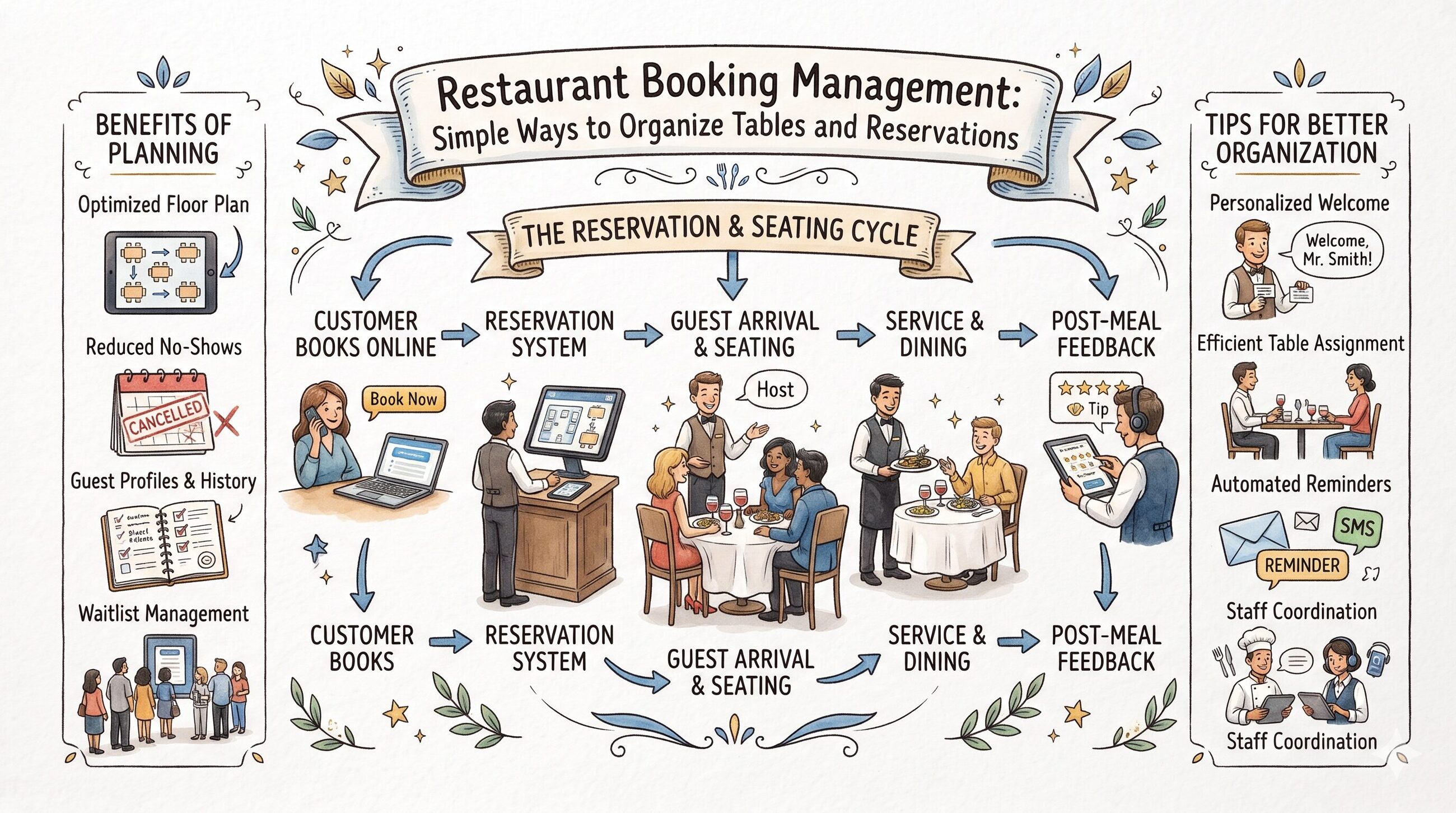
Restaurant booking management helps teams organize reservations and plan seating. A clear process allows staff to check booking details, track table availability, and prepare for busy periods. Digital booking tools can make these tasks easier by keeping important information together.
However, every restaurant has different needs. A small café may need a simple booking calendar, while a large dining room may need detailed table planning. This guide explains the main methods, useful features, common mistakes, and practical steps for better booking management.
What Is Restaurant Booking Management?
Restaurant booking management is the process of organizing table reservations from the first request to the guest's arrival. It includes recording booking details, checking table availability, managing changes, and preparing suitable seating.
Restaurants can manage bookings through paper diaries, spreadsheets, phone records, or digital software. Each method can work when staff follow clear procedures.
A digital system may help teams view reservations, update table status, and manage waiting lists. Some systems also offer online booking forms, reminders, and reports.
The main purpose is to keep booking records accurate and make daily restaurant operations easier to manage.
Why Is Booking Management Important?
A restaurant needs to balance guest demand with available tables and staff time. Good booking management helps the team make these decisions with greater care.
Better Control Over Reservations
A clear booking record helps staff check existing reservations before accepting new requests. This reduces the risk of duplicate bookings and missing details.
More Effective Table Use
Different parties need different table sizes. Staff can use booking information to assign suitable tables and plan upcoming arrivals.
Less Confusion During Service
When staff share accurate booking information, they can find guest details faster. This helps the team handle busy periods with fewer interruptions.
Improved Guest Communication
Guests want clear information about their reservations. A reliable process helps staff confirm bookings, explain delays, and record changes.
Smarter Staff Planning
Booking patterns can show when the restaurant expects more guests. Managers can use this information to plan shifts and prepare the dining area.
Different Ways to Manage Restaurant Bookings
Restaurants can choose a method based on their size, budget, and daily booking volume.
Paper Booking Diaries
A paper diary offers a simple way to record reservations. Small restaurants may find it useful when they handle only a few bookings.
However, paper records require careful updates. Staff may also find it difficult to share changes across shifts.
Spreadsheets
Spreadsheets allow teams to organize bookings by date, time, and party size. They can work well for restaurants with basic needs.
Still, staff must maintain the records. Spreadsheets may not provide automatic confirmations, live table views, or dedicated waitlist tools.
Digital Booking Software
Digital software helps restaurants store reservations in one place. Depending on the product, it may include table management, guest notes, online booking, and reporting.
This option may suit restaurants that manage many bookings or need better coordination between staff members.
Website Booking Forms
Website forms allow guests to request tables online. They can make booking more convenient and reduce some phone calls.
Restaurants must keep available times and booking rules accurate. Staff should also understand how the system handles changes and cancellations.
Essential Features for Better Booking Control
Not every restaurant needs an advanced booking system. Owners should focus on features that solve their most common problems.
Feature | Main Use | Practical Benefit |
|---|---|---|
Booking calendar | Organizes reservations by date and time | Helps staff prepare for service |
Online booking | Accepts guest requests through supported channels | Makes booking more convenient |
Table management | Tracks table assignments and status | Supports better seating decisions |
Floor plan | Shows table positions and sizes | Helps staff plan seating |
Waitlist | Records guests waiting for tables | Organizes walk-in demand |
Guest notes | Stores relevant booking requests | Helps staff prepare |
Confirmations | Sends booking confirmations when supported | Keeps guests informed |
Reminders | Sends messages before visits when supported | May reduce forgotten bookings |
Reports | Summarizes booking activity | Helps managers review trends |
Staff permissions | Controls access to system functions | Supports responsible data handling |
Before selecting software, check which features come with the plan. Some providers charge extra for certain tools or additional users.
How to Plan Tables and Seating
Table planning requires more than checking how many seats remain. Staff must consider party size, table location, booking time, and expected dining duration.
A floor plan can help the team see the dining room layout. Depending on the system, staff may view tables marked as free, occupied, reserved, or awaiting preparation.
For example, imagine a restaurant with twelve tables. Several parties have bookings between 6 p.m. and 7 p.m. The host can review the schedule and assign suitable tables before guests arrive.
The team should also allow time to clean and reset tables. Guests may stay longer than expected, so staff should avoid making unrealistic promises about seating times.
Practical tip: Review table assignments before every service. Adjust the plan when bookings change or the restaurant expects unusually high demand.
Managing Online Bookings, Phone Calls, and Walk-Ins
Guests may reserve tables through several channels. A restaurant needs one clear process for handling each request.
Online Reservations
Guests can request tables through supported booking pages. The restaurant should show clear times, party-size limits, and booking policies.
Phone Reservations
Staff should enter phone bookings into the main booking record. Keeping them in a separate notebook can cause conflicts with other reservations.
Walk-In Guests
Walk-in guests need clear information about table availability. A waitlist helps staff record party sizes and organize waiting guests.
Changes and Cancellations
Guests may cancel, arrive late, or change their party size. Staff should update the booking record as soon as possible.
Keeping all booking details current helps the team make better seating decisions and communicate clearly.
A Simple Daily Booking Workflow
A consistent routine helps staff manage reservations from opening to closing.
Stage | Staff Action | Goal |
|---|---|---|
Before opening | Review upcoming bookings | Understand expected demand |
Before service | Check table assignments | Prepare suitable seating |
At guest arrival | Confirm the reservation | Find booking details quickly |
During service | Update table status | Keep availability accurate |
After a change | Record the new details | Prevent outdated records |
After closing | Review booking issues | Improve future planning |
Managers should assign clear responsibilities for these tasks. Every team member should know who handles changes during busy service.
Common Booking Mistakes to Avoid
A booking system cannot deliver good results when staff use it inconsistently. These mistakes can affect daily operations.
Recording Bookings in Different Places
Staff may use paper notes, messages, and spreadsheets at the same time. This can lead to missing details and double bookings.
Better approach: Use one main booking record and enter every reservation promptly.
Accepting More Bookings Than the Restaurant Can Handle
A full calendar may put pressure on the kitchen and service team. Too many bookings can lead to delays and poor guest experiences.
Better approach: Set booking limits based on seating, staffing, and expected dining times.
Forgetting to Update Cancellations
Old reservations may block tables that guests could otherwise book.
Better approach: Update cancellations and booking changes as soon as the team receives them.
Giving Unclear Waiting Estimates
Guests may become frustrated when staff cannot explain delays.
Better approach: Give realistic estimates and share updates when the situation changes.
Skipping Staff Training
Employees may follow different methods when nobody explains the process.
Better approach: Train staff on booking entries, table updates, cancellations, and waitlist management.
Ignoring Booking Reports
Booking records can reveal useful trends, but managers may overlook them.
Better approach: Review booking activity regularly and use the results to improve seating and staffing plans.
How to Choose Suitable Booking Software
The right software should fit the restaurant's daily needs. Owners should compare practical value instead of choosing a system only because it offers many features.
Selection Factor | What to Check |
|---|---|
Ease of use | Can staff learn the system quickly? |
Booking channels | Does it support the methods guests use? |
Table planning | Can it handle the restaurant's layout? |
Pricing | Are there setup fees or extra charges? |
Guest communication | Does it support useful confirmations or reminders? |
Staff access | Can managers control user permissions? |
Reporting | Does it show useful booking trends? |
Data protection | Does the provider explain its security practices? |
Customer support | What help can the restaurant receive? |
Future needs | Can the system support expected growth? |
Ask for a demonstration when possible. Test common tasks such as creating a booking, changing a reservation, and recording a cancellation.
Read the pricing terms carefully. A low starting price may not include every feature your restaurant needs.
Protecting Guest Information
Booking records may contain names, contact details, arrival times, and special requests. Restaurants should collect only the information they need.
Use individual staff accounts when available. Give employees access based on their roles, and remove access when they leave the business.
Review the provider's privacy terms and security options. Train staff to handle guest information carefully and avoid sharing it without a valid reason.
Clear data rules help protect guests and support responsible restaurant operations.
How DineGlobe Fits Into Restaurant Booking Management
DineGlobe focuses on restaurant booking and reservation management. Restaurant owners can review its current offering to see whether it suits their workflow.
Before choosing DineGlobe or another provider, check the available features, pricing, support options, and service terms. Confirm that the system supports your most important tasks.
The best booking solution should make daily work easier. It should fit the restaurant's service style and help staff manage reservations without adding unnecessary steps.
Frequently Asked Questions
What is restaurant booking management?
Restaurant booking management means organizing table reservations, checking availability, and tracking booking changes. It helps staff prepare for guest arrivals.
Can small restaurants use booking software?
Yes. Small restaurants can use booking software to organize reservations and reduce paperwork. They should choose a system that matches their budget and needs.
Does restaurant booking software support online reservations?
Many systems support online bookings. Check the provider's current features to confirm which booking channels it offers.
How does table management help a restaurant?
Table management helps staff track seating assignments and table status. This supports better planning and reduces confusion during service.
Can a booking system manage walk-in guests?
Some systems include waitlist tools. Staff can record waiting parties and organize seating as tables become available.
Can reminders reduce missed reservations?
Reminders may help guests remember their bookings. However, they cannot prevent every no-show or last-minute cancellation.
How can restaurants avoid double bookings?
Use one main booking record and update it promptly. Staff should check existing reservations before accepting new requests.
What should owners check before buying booking software?
Compare features, price, ease of use, support, privacy, and reporting. Test the main functions before making a final decision.
How should restaurants protect booking information?
Collect only necessary details, limit staff access, and follow sound security practices. Review the provider's privacy terms before using the system.
Can booking management improve guest satisfaction?
It can help staff organize reservations and arrivals. Guest satisfaction also depends on food quality, service, communication, and the overall dining experience.
Final Thoughts
Effective booking management helps restaurants plan seating, prepare for arrivals, and handle changes with less confusion. A suitable system can bring reservation details together and support better teamwork.
However, technology works best when staff follow clear procedures. Accurate records, regular training, and honest communication remain essential.
Start by identifying the booking problems your restaurant faces most often. Compare tools that address those needs, test their main features, and choose a system your team can use confidently. A clear booking process can help create smoother service and a more welcoming experience for guests.